Imagine this. It’s Sunday night, and you have 9 tabs open.
Instagram insights in one. Your email platform in another. The sales dashboard, the bank feed, the spreadsheet, and finally the doc where the report you’re working on actually lives. You’re copying the same 5 numbers into the same 5 boxes you filled in last week, and the week before that, and every week since you decided to be the kind of business owner who tracks things.

The format hasn’t changed in a year.
Somewhere around tab 6, the thought lands: why am I still the one doing this?
Real talk: you don’t have to be. My team used to lose a chunk of every Monday to assembling our weekly report. Same sections, same sources, same slog. Now AI assembles it and we review it, and I’m a little annoyed we didn’t set it up sooner.

So here’s the full walkthrough: How to tell if your report can be automated (spoiler alert: it almost certainly can), the exact prompt that builds it the first time, and how to put it on a schedule so the finished draft is waiting for you instead of the other way around.
What does it actually mean to automate a report with AI?
Automating a report with AI means you define the report once, store that definition with your format and data sources, and let AI assemble each new edition from fresh numbers on a schedule. You review and send. The thinking stays yours, and the assembling stops being your job.
Before you touch any tool, though, your report has to pass a 3-part test.
1) Defined. You need to be able to say in one sentence what the report answers and who it’s for. Something as simple as “This tells me whether my Instagram content is actually growing my email list, and it’s for me” absolutely counts.
2) Structured. Your report has to have the same sections every time. Make sure you have a format you like before you automate anything.
3) Data sources. The data that you enter into the report has to come from the same places every time. Same platforms, same spreadsheet, same export.
That’s all you need to automate any report you create. As long as you can describe your report clearly, it has a structure, and you can identify the data sources, the tech is now the easy part.
Why is a report the perfect first thing to automate?
A report is one of the best first things to automate because it’s recurring and it’s very manual. You’ve probably spent months doing the hard part by hand: deciding what matters, what order it goes in, and where every number comes from. You’ve been writing its instruction manual every single time you built it, you just never handed the manual to anyone.
I wanted a big dramatic statistic here about how many hours business owners lose to reporting. I went looking, and every number I found traces back to a company selling reporting software, so I’m not quoting any of them. Do your own math instead. If your report takes 2 hours a week, that’s over 100 hours a year spent moving numbers between tabs, and that is before you count the other recurring jobs quietly eating your week, which I walked through in how to use AI to save 10+ hours a week. Your rate times 100 is the real cost, and you don’t need a vendor survey to feel it.
And this is not just a marketing thing:
- A wedding planner sending every client a weekly planning status update
- A fitness coach summarizing check-in data every Friday
- A real estate agent’s monthly market recap for their buyer list
- A bookkeeper’s month-end summary for each client
- A virtual assistant reporting weekly to the business owner they support
- A course creator’s weekly content and list-growth report (hi, this was us)
Different businesses, identical anatomy.
How do you get AI to build your report the first time?
The first thing you want to do is give AI one or two past reports as the format example. Then you’ll attach your latest data as an export or paste, and ask it to produce the new edition in the same structure. Review the draft against your raw numbers, and you’ve turned hours of assembling into minutes of checking.
Don’t skip ahead to the scheduling part. This first manual run is where you teach it your standards, and it takes about 20 minutes.
Dig up the one or two past reports you thought were the best ones and then run this prompt, with the past report and this week’s data attached:
The Prompt
Highlight, copy, and swap the brackets for your details before you say go.
Once you’ve gotten the output back from your AI, read the plan before you say go. That final line is the most valuable sentence in the prompt, because it surfaces every wrong assumption while it’s still a 2-minute conversation instead of a rebuilt report. If you read my post on turning a PDF into an interactive quiz, it’s the same trick. It works everywhere, and it is one of the patterns in my guide to writing AI prompts that get better outputs.
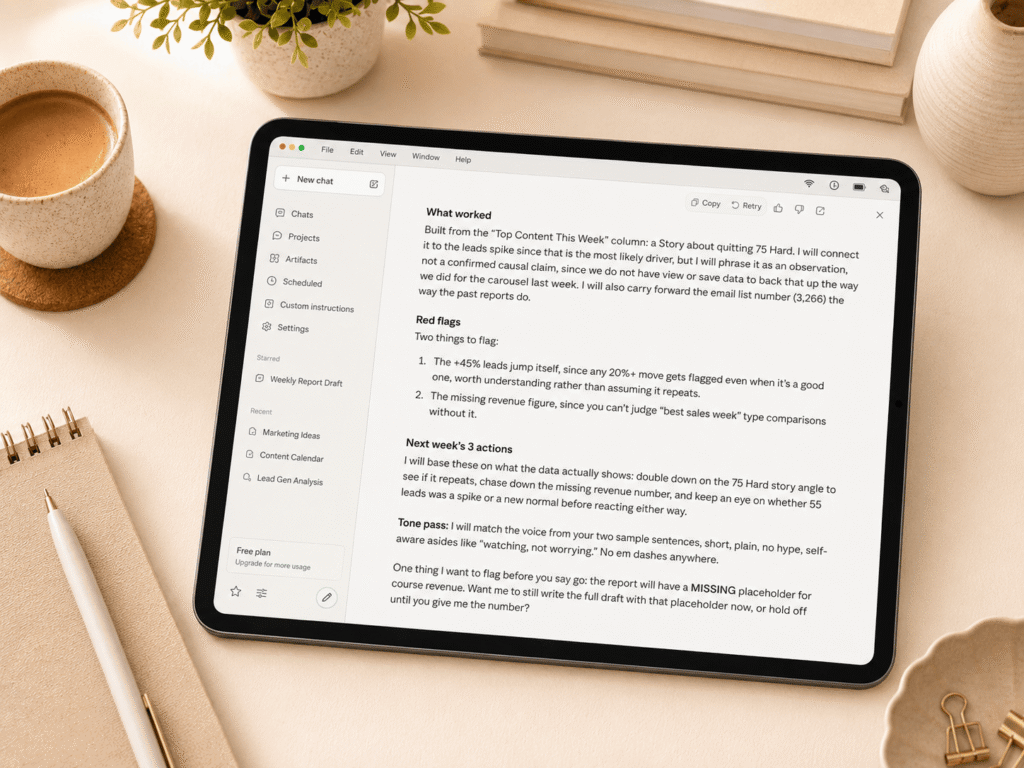
Lastly, check the data. Verify every number in the draft report against the source this first time. AI is a fast assembler and a confident one, which is exactly why the prompt bans invented numbers and why you review. Once it’s earned your trust on a few runs, the check gets faster.
You could stop right here and still win back most of your reporting time. But the next 2 steps are where it gets fun.
How do you stop feeding it data by hand?
Now that you’ve got all the main sections of your report defined, it’s time to organize it. Move the report and all associated items into a “Project” on Claude or ChatGPT. A project is a saved workspace where your template, definition, gold-standard reports, and voice notes live permanently. Think of the project as the filing cabinet your report lives in. Instead of re-attaching your template and re-explaining your standards every week, they’re just there. Every major AI tool has a version of this, and it’s the difference between repeating yourself forever and setting it up once.
Then there’s the data. You need to connect your data source directly, so numbers flow in without exports. If your numbers live in a tool that connects directly to your AI (social media analytics platforms were among the first to do this, and Metricool’s connection is the one my team uses), the copying disappears entirely. The AI reads the numbers at the source. Your email platform can work the same way, which I walked through in my full guide to running email marketing with AI. Most tools can now be connected directly to Claude or ChatGPT as “connectors” or MCPs.
If your data lives somewhere without a connection yet, you’re not stuck: a quick export or even a screenshot dropped into the chat does the job, and honestly, dragging 1 file in beats 9 tabs every time.
One more thing belongs in that project? Your voice. A report written in stiff robot-speak gets skimmed, and a report that sounds like you gets read, especially when a client is the reader. This is where having your voice documented pays off yet again. If you have a Brand Book, drop the voice section into the project and every report comes out sounding like you wrote it. If you don’t, paste in 3 sentences you actually wrote and tell it to match the rhythm, which is the 5-minute version of training AI to write in your brand voice.
How do you make the report run without you?
Alright, so now let’s get to the scheduling back. How do you automate the report creation?
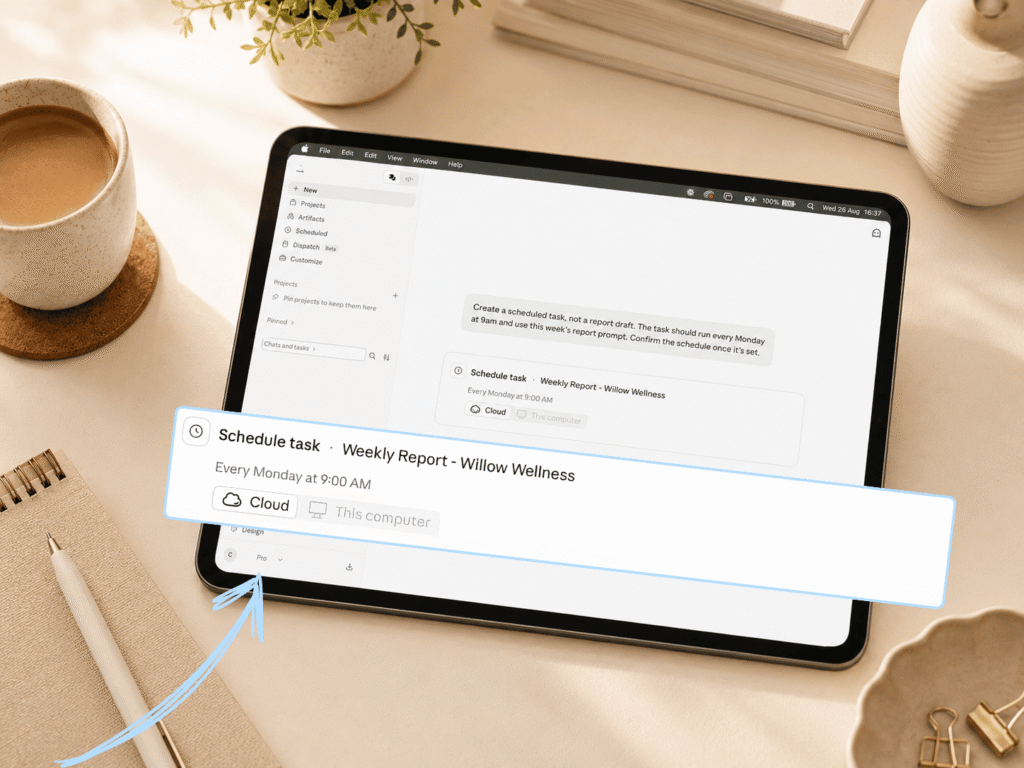
Go back into the project you just built and task it to run the report on a schedule. Because the project already holds your template, your definition, and your data source, the scheduled task needs just one main instruction: Run this week’s report every Monday. It drafts while you’re away from your desk, and you review the outcome.
This is the part that still feels slightly like a magic trick to me, and it’s also the part where you get to do almost nothing. You’re not writing new instructions or copying your prompt anywhere. Everything the report needs is already sitting in the project. You’re just telling it when to run.
In Claude, the whole setup takes about a minute. Here’s the path.
1. Open the project you built for the report. Everything the task needs is already sitting in there, so this is just where you’re standing when you set it up.
2. Find Scheduled in the left sidebar. It’s the one with the little clock icon, under New, Projects and Artifacts. Click it and you land on your Scheduled tasks page, which is empty the first time.

3. Click New task in the top right. You get two options: Create with Claude, which walks you through it in conversation, or Set up manually, which just hands you the fields.
4. Go manual and fill in four things. A task name you’ll recognize on a Monday. The prompt, which is your one line: run this week’s report using everything in this project and have the draft ready for my review. The approval mode. And the frequency, set to weekly.
5. Hit Save.

That’s it. Your task now lives on the Scheduled tasks page, where you can edit the instructions, change the cadence, pause it during a launch week, or hit run if you need the report early. (Here’s the current setup guide, since these details move fast.)
From here on, the report runs while you’re away from your desk, whether your laptop is open or not. You walk in, open the draft, and review the outcome.
It’s how our Monday report works. The draft is sitting there before my team starts the day, built from the same sources, in the same format, every week. Someone reads it, checks anything flagged, tightens a line or 2, and done.
And that review step isn’t a downgrade from “fully automated.” It’s the design. AI is your COO here, not your CEO. It executes a system you defined, and you stay the one who decides what the numbers mean and what happens next. The human in the loop of processes like these matter a lot.
What if your report is a mess and different every time?
If your report comes back as a mess, then it’s probably not an automation problem. It’s a definition problem, and the fix is the same definition exercise from the first build: a sentence on what it answers, the formatting and section, and the data or numbers that matter.
Most “I tried AI and it didn’t work” stories are secretly this. Someone pointed AI at a task they’d never actually defined, got mush back, and blamed the tool. The tool was fine. The instructions didn’t exist yet.
Which is weirdly good news, because it means the afternoon you spend defining your report isn’t busywork before the real thing. It IS the real thing. Do it once and you’ve built an asset: a report that any tool, any VA, or any future version of your business can run.
What else passes the 3-part test?
Anything defined, structured, and repeatable can run the exact same play: client status updates, a weekly team check-in, month-end bookkeeping summaries, student progress reports, content performance roundups, and podcast episode recaps all qualify.
Run your own audit. Anything you produce on a schedule, with the same sections, from the same sources, is a candidate. My suggestion is to automate one thing first, run it for a few weeks until you trust it, and only then pick the next. If you want the wider map of where AI fits, start with how to use AI in your online business.
And it doesn’t have to stay in your business. The same anatomy shows up at home: a weekly meal plan built from the same grocery list logic, or a family calendar recap every Sunday. Defined, structured, repeatable. The test doesn’t care where the report lives.
Frequently asked questions
- Can AI pull numbers straight from my spreadsheet? Yes. Connect your drive, add the specific spreadsheet to your project, and spell out exactly where the numbers live: which tab, which columns, which date range. “Pull new leads from the Weekly Numbers tab, column C” will beat “check my spreadsheet” every single time. For a scheduled run, the file has to live in that connected spot, not loose on your desktop.
- What happens when it gets a number wrong? The same thing that happens when a human assistant does: your review catches it. Build the “never invent a number, mark it MISSING” rule into your prompt, spot-check against sources until it earns trust, and keep the review step forever.
- Do I need a paid plan for this? The first-build and project steps work on most plans. Scheduled tasks generally sit on paid tiers, and availability shifts often enough that the tool’s own help docs are the only answer worth trusting. The 3-part test and the prompt cost you nothing.
- Is this safe for client data? Treat it like any tool that touches client information: check your AI plan’s data settings, don’t paste in anything you wouldn’t put in a Google Doc, and anonymize where you can. A report on your own business metrics is low risk. Client financials deserve the extra 10 minutes of settings review.
- Which AI tool should I use? The pattern is the point, not the platform. The major AI tools each offer some version of projects and scheduled tasks, so build in whichever one you already pay for. The walkthrough above reflects how my team runs it, and the prompt travels anywhere.
The short version
Your weekly report is the most automatable thing in your business, because you already did the hard part. You defined it, structured it, and made it repeatable. You just kept doing the assembly yourself.
So stop. Write the 1-sentence definition. Feed AI your best past report and this week’s numbers, make it show you the plan before it builds, and check its work. Then move it into a project, connect the data, and ask the project to run it on a schedule.
Next Sunday night, those 9 tabs stay closed.
Where to go next
If you want to go deeper on any piece of this, here’s where to dig in:
- Why every AI assistant needs a Brand Book, the fix for reports that read like a robot wrote them
- The best AI tools for online business owners, if you’re still deciding where to build this
- How to run your email marketing with AI, the same connect-once logic applied to your list
- How to use AI in your online business
And if this clicked something open for you about what else in your business could run this way, that’s the actual game. AI All Stars is where I teach the full system: an AI dream team trained on your business that handles the assembling, drafting, and reporting while you make the decisions. Not sure yet? Start with my free AI workshop and see how this approach feels. Ready when you are.
The Report You Build Every Week Can Now Build Itself