


You probably have 1 or 2 freebies sitting in a folder somewhere. A checklist, maybe a workbook, possibly a guide with a very nice cover that you were very proud of at the time.
People download them. They skim page 2. They never open them again.
That’s not a lead magnet problem, it’s a format problem, because a PDF hands someone a pile of information and then makes them figure out which parts apply to their life. A quiz, on the other hand, does the work for them and hands back an answer about them.
Picture the difference: A nutrition coach could give away “10 Reasons You’re Tired All the Time,” or she could give away a 3 minute assessment that says your energy score is 42, you’re in the Blood Sugar Rollercoaster category, and here are the 3 things to change first. Same expertise, same coach, completely different experience for the person on the other end.
And you don’t have to write any of it from scratch, because you already did. It’s sitting in the PDF you made 8 months ago.
The whole process is 2 sentences long. You upload your existing PDF lead magnet to Claude or ChatGPT, add a screenshot of a design you like, and ask it to build an interactive assessment using the questions already in the document. One prompt gets you a working quiz, with no code, no quiz software subscription, and no rewriting the freebie you already made.
I rebuilt one of mine last week with a single prompt and a screenshot, and what came back wasn’t a rough prototype, it was an actual working tool I could put on a page. So let me walk you through how it works, what to say to get a good version instead of a generic one, and the part almost nobody explains properly: how you actually publish the thing and connect it to your email list.

What is a lead magnet?
A lead magnet is the free thing you give someone in exchange for their email address. A checklist, a guide, a template, a short training, a swipe file. It has 2 jobs: get someone onto your list, and give them a quick win fast enough that they think “if the free stuff is this good, the paid stuff must be really good.”
Most lead magnets do the first job and completely whiff the second one, which is the actual problem we’re solving here. You’re not failing at lead magnets. You’re using a format that makes the win almost impossible to deliver.
What is an interactive lead magnet?
An interactive lead magnet is a quiz, assessment, or calculator that gives someone a personalized result based on their answers, instead of a static file they download and forget about.
Same expertise, different delivery. You’re still teaching exactly what you always taught, but instead of a document they have to interpret, they walk away with a score, a category, or a number that’s specifically about them.
A few versions of this that work, across very different businesses:
- A decluttering coach turns her room-by-room worksheet into a “What’s your clutter type?” quiz that names the pattern and gives 3 places to start.
- A real estate agent turns her seller prep checklist into an “Is your home actually ready to list?” score, which tells someone whether they’re 3 weeks or 3 months away.
- A health coach turns her habits audit into an energy assessment that scores sleep, food, movement, and stress separately, then tells someone which one is costing them the most.
- A wedding planner turns her budget worksheet into a calculator that spits out a realistic number for their guest count and city, which is the single question every couple actually wants answered.
- A course creator turns her launch checklist into a readiness score that tells someone whether they’re ready to sell or still 2 steps out.
Every one of those already existed as a document. Almost nobody was finishing them.
The personalized result is the entire point, because people will happily trade an email address for an answer about themselves, and they’ll actually finish something that’s about them.
Why do PDF lead magnets stop working?
PDFs put all the effort on the reader, who has to read the thing, decide which parts apply to their situation, and then go do something about it. Most people stop at step 1, so the freebie never delivers the small win that makes someone trust you enough to buy from you later.
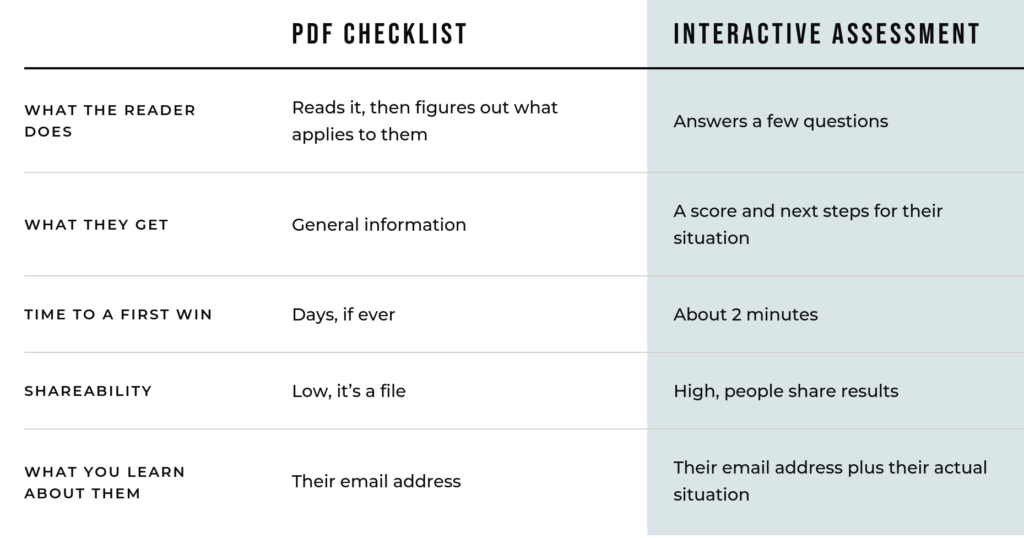
That last row is the one everybody skips right past, and it’s the most valuable thing on this page. When someone tells you their clutter type or their energy score, you know something real about them before you’ve ever spoken, which is segmentation you can actually use in your email automations without sending a survey nobody fills out.
Do interactive lead magnets actually convert better?
Nobody can tell you reliably. The 2.4x and 10x figures repeated across marketing blogs trace back to companies selling quiz software rather than to a primary study you can read, so the defensible reason to switch is the data you collect, not a conversion multiplier.
I went looking for a solid comparison before writing this, because I wanted a number I could stand behind. What I found was the same handful of stats restated confidently across dozens of posts, ranging from 2.4x all the way up to 10x, with 40% opt-in rates thrown around like that’s a normal thing that happens.
That spread is the tell. Numbers that vary by a factor of 4 aren’t measuring the same thing, and not one of them leads back to a study with a method you can check, so I’m not going to repeat them at you.
The honest case doesn’t need the statistics anyway. A PDF tells you exactly 1 thing about a new subscriber, which is their email address, while a scored assessment tells you their situation in their own answers before you’ve ever spoken to them. That’s true whether your opt-in rate moves or not, and it completely changes what you’re able to send them next.
If you rebuild one of your own freebies, watch your own before and after. Your number beats anyone else’s, and it’s the only one you can actually trust.
How do you turn a PDF into an interactive quiz with AI?
Upload the PDF and a screenshot of a design you like, then ask for an interactive assessment built from the questions already in the document, and review the plan before you approve the build.
Here are the 5 steps.
1. Pick the freebie that already has questions in it
A checklist, an audit, a readiness worksheet, a scorecard, an intake form. Anything with a list of yes-or-no items is already halfway to being a quiz. If your only freebie is a pure teaching guide with no questions in it, that’s a slightly bigger project, so start with something else if you have it.
2. Screenshot a design you like
This is the step almost everyone skips, and it’s the entire difference between something that looks like a 2013 web form and something that looks like it belongs on your website. Find an app or a landing page with a look you want, screenshot it, and hand it over with your prompt. You’re not copying anyone, you’re giving the model a target instead of letting it fall back on its own generic defaults.
3. Give it the prompt below
Attach both files, and pay attention to that last line, because it does more work than the rest of the prompt put together.
I want to turn an existing lead magnet into an interactive assessment I can put on my website.
Attached: my PDF lead magnet, and a screenshot of a design I like.
Build the assessment from the questions and scoring already in the PDF. Do not invent new questions unless something is genuinely missing, and if you add any, tell me which ones.
Details:
My business: [what you do, who you help]
What someone gets from this assessment: [the specific outcome]
Keep it under 10 questions
At the end, give them a score, a category or type, and 3 specific next steps based on how they answered
Styling: match the fonts, color palette, and layout feel of the screenshot
Make it work on mobile
Write the copy in my voice. Here are 3 sentences I actually wrote: [paste them]
Build this as a single self-contained HTML file so I can publish it or host it myself.
Before you build anything, tell me your plan and flag anything in the PDF that will not translate into a quiz. Wait for me to say build.
4. Read the plan before you let it build
That final instruction, wait for me to say build, is the most important sentence in the whole prompt. Without it you get a finished thing built on a stack of assumptions you never agreed to, and now you’re editing someone else’s work instead of directing your own. With it, you get a 2 minute conversation first and a far better build second.
5. Test it like a stranger would
Answer as your dream client, then go back and answer as someone who is a genuinely terrible fit for you. If both people get the same result, your scoring logic is broken and it needs another round. This takes about 4 minutes and it’s the difference between a tool people trust and a tool that quietly makes you look sloppy.
How do you make it look like your brand instead of a template?
Give the model a screenshot of the look you want and a sample of your actual writing, because design references stop it defaulting to generic layouts and writing samples stop the copy sounding like a software onboarding flow.
The visual half is the screenshot, which is easy. The voice half is harder, and it’s where most AI output falls apart, because generic quiz copy reads like a bank form when yours should sound like you talking to 1 person.
This is where having your voice, your audience, and your offers written down in 1 place pays for itself. If you have a Brand Book, paste the voice section straight into the prompt and watch the output change. If you don’t have one, paste in 3 sentences you actually wrote and tell it to match the rhythm, which isn’t as good but beats nothing by a mile.
How do you actually publish it and connect it to your email list?
This is the part that trips people up, so here’s the full picture. When Claude builds your quiz, it appears as an artifact, which is the live preview panel next to the chat. That’s a real working web page, not a mockup, and you have 3 ways to get it in front of your audience depending on how much tech you want to touch.
Option 1: Publish the artifact and deliver it as the freebie
Hit Publish and Claude gives you a public link that anyone can open in a browser with no account and no sign-in required. Then use your normal opt-in page, and set your thank you page or delivery email to send people to that link. The email capture happens the way it always has through your email platform, and the quiz is simply what they get instead of a PDF. This takes about 10 minutes and requires zero technical skill.
The tradeoff is that the link lives on a claude.ai URL rather than your domain, and published artifacts can be found by search engines, so treat it as public. You can unpublish it later, though that’s permanent.
Option 2: Embed the published artifact on your own page
Claude also lets you embed a published artifact in another site and specify which domains are allowed to load it, so you can drop it onto a page on your own website with your own header, footer, and branding around it. Your reader never leaves your site, which is a much better experience, and you can put your email form directly above or below the quiz.
Option 3: Download the HTML and host it yourself
This is the version I’d build if this is going to be a real, permanent part of your funnel. Download the file, then either paste it into a custom code block on your site builder or drag it into a free host like Netlify. Now it’s on your domain, you control it completely, and you can paste your email platform’s form embed code directly into the results gate so submissions land on your list automatically, tagged and everything.
Whichever route you pick, capture the email before you show the result, not after. Someone who’s just answered 8 questions about their own life is invested, and that’s the exact moment they’ll happily hand over an address to find out their score. Ask before they’ve answered anything and you’ve spent all that momentum on a form.
One more thing worth setting up. If you want the quiz results to actually live on the subscriber record, give each result category its own CTA link on the results screen and use link-click triggers in your email platform to tag people accordingly. Someone who lands in the Blood Sugar Rollercoaster category clicks a different link than someone who lands in Chronic Under-Sleeper, and now your list is segmented without you doing anything manual. That’s the whole reason to build this in the first place, so don’t skip it.
What else can you turn into an assessment?
Anything you already have that involves questions, scoring, or a calculation:
- A readiness checklist, into a readiness score
- A pricing or budget worksheet, into a calculator that shows the actual number
- A client intake form, into a fit-check quiz
- An audit template, into a scored audit
- A “which option is right for you” chart, into an actual recommender
- A symptom or habits tracker, into a scored self-assessment
- A course curriculum, into a placement quiz that tells someone where to start
You don’t need a library of these. Go look at the 1 or 2 freebies you already have, and pick whichever one has the most questions in it.
Where to go next
If you want to go deeper on any piece of this, here’s where to dig in:
- Why every AI assistant needs a Brand Book, the actual fix for generic output
- How to train AI to write in your brand voice
- AI prompts for entrepreneurs
- How to run your email marketing with AI, for the tagging and segmenting half
- How to use AI in your online business
And if you’re ready to stop building these one at a time, with my exact assistant instructions and knowledge files, that’s what AI All Stars is built for.
Turn Your PDF Lead Magnet Into an Interactive Quiz