


Most email platforms slap an “AI” label on a subject line generator and call it innovation.
But Kit? They just did something actually worth paying attention to.
They released an MCP integration that connects your AI tools (like Claude!) directly to your Kit account. Not as a gimmick. As a full-on command center for your email marketing.
I’ve been in the beta group testing this for the past month, and I’m not exaggerating when I say it has fundamentally changed how I interact with my email list. We’re talking about pulling years of broadcast data in seconds, building subscriber segments through a conversation, and setting up automated dashboards that update themselves every morning.
This post is the one-stop-shop. What the Kit MCP is, how to set it up, and the actual use cases that make it worth your time. If you use Kit for your email marketing (or you’re thinking about it), bookmark this one.
📥 Grab the free Kit MCP Prompt Pack Below: 29 copy-and-paste prompts for email analysis, subscriber segmentation, sequence building, and more.
So, What Is the Kit MCP?
The Kit MCP is a direct connection between your Kit email marketing account and the AI tools you already use, like Claude, ChatGPT, or Gemini.
MCP stands for Model Context Protocol. It’s an open standard (created by Anthropic) that lets AI assistants securely interact with software platforms. In plain English: instead of your AI tool just knowing generic stuff about email marketing, it can now see YOUR actual data. Your subscribers. Your open rates. Your sequences. Your tags. All of it.
And it doesn’t just look at your data. It can take action on it, too.
That second part is what makes this different from basically every other “AI integration” in the email marketing space. Most platforms give you read-only access (if they give you anything at all). Kit’s MCP gives you full read AND write capabilities. You can analyze your broadcast performance and then immediately draft a new email based on what you learned, tag a segment of subscribers, or build an entire welcome sequence. All from the same conversation with your AI tool.
The Kit MCP exposes over 50 tools that cover Kit’s complete public API. That means there’s no “limited subset” situation where you can see some things but not others. If you can do it in Kit’s dashboard, you can do it through the MCP.
One more thing that matters: you’re not locked into one AI vendor. The Kit MCP works with any MCP-compatible client. Use Claude? Great. Prefer ChatGPT? Also great. Want to use Cursor or Windsurf for something more technical? Go for it. Your choice.

How Do You Set Up the Kit MCP?
Setup takes about three minutes, requires zero coding, and you can revoke access any time you want.
Here’s how to connect it in Claude (which is what I use and recommend):
- Go to claude.ai/settings/connectors
- Click “Add a custom connector”
- Enter “Kit” as the name and add the MCP URL: https://app.kit.com/kit-mcp
- Authorize through Kit in the popup window
- If you’re using Claude Desktop, fully quit and reopen the app
That’s it. Once it’s connected, Claude can see and interact with your entire Kit account.
For ChatGPT, Cursor, Windsurf, and other clients, the setup is manual using the same MCP URL. Kit has a solid walkthrough in their knowledge base if you need it.
The important thing to know: nothing happens in your Kit account without your approval. You control the permissions. You can see what the AI is doing before it executes. And you can disconnect any time.

What Can You Actually Do With the Kit MCP?
This is where it gets good. Let me walk you through the use cases that have me genuinely fired up. These aren’t hypothetical. These are things I’ve done, and things other beta creators have built in the first few weeks of testing.
Analyze Your Email Performance in Seconds
You know that thing where you want to know which of your broadcasts performed best over the last quarter, but actually figuring that out means exporting CSVs, sorting spreadsheets, and losing 90 minutes of your life?
Gone.
With the Kit MCP, you can literally ask: “Which of my broadcasts had the highest open rates in the last 90 days, and what do the top-performing subject lines have in common?”
You get a ranked report with pattern analysis. Which subject line styles are winning. Which links got the most clicks. What your open rate trend looks like compared to the previous period. The kind of analysis that used to require an analyst (or a very tedious afternoon).
You can also run list health audits in a single conversation. Active vs. inactive subscriber ratios, tagging coverage, engagement trends, and recommendations for what to clean up. The kind of thing most of us do once a year (if we’re being honest), and now it’s a 30-second prompt.
Build and Optimize Email Sequences with AI
One of the beta creators had a Creator Network recommendation come in one morning. She realized she didn’t have a welcome sequence set up for those new subscribers, and she had about 10 minutes before she had to leave for the day.
She opened the Kit MCP, told her AI assistant what she wanted, and had a full welcome sequence built before she walked out the door.
The AI reads your existing broadcasts to learn your voice, then writes the sequence emails, creates the tags to trigger it, and sets the whole thing up inside your Kit account. All from one conversation. A welcome sequence that would normally take 3-4 hours? Done in 15 minutes.
You can also turn voice memos into published broadcasts. One beta creator recorded a three-minute voice memo about what he wanted to send his list, and the AI cleaned up the transcript, matched his voice based on his previous emails, and pushed a polished draft into Kit. No more “I’ll write that email later” (and then never writing it).
Mine Your Email Archive for Gold
This one genuinely blew my mind.
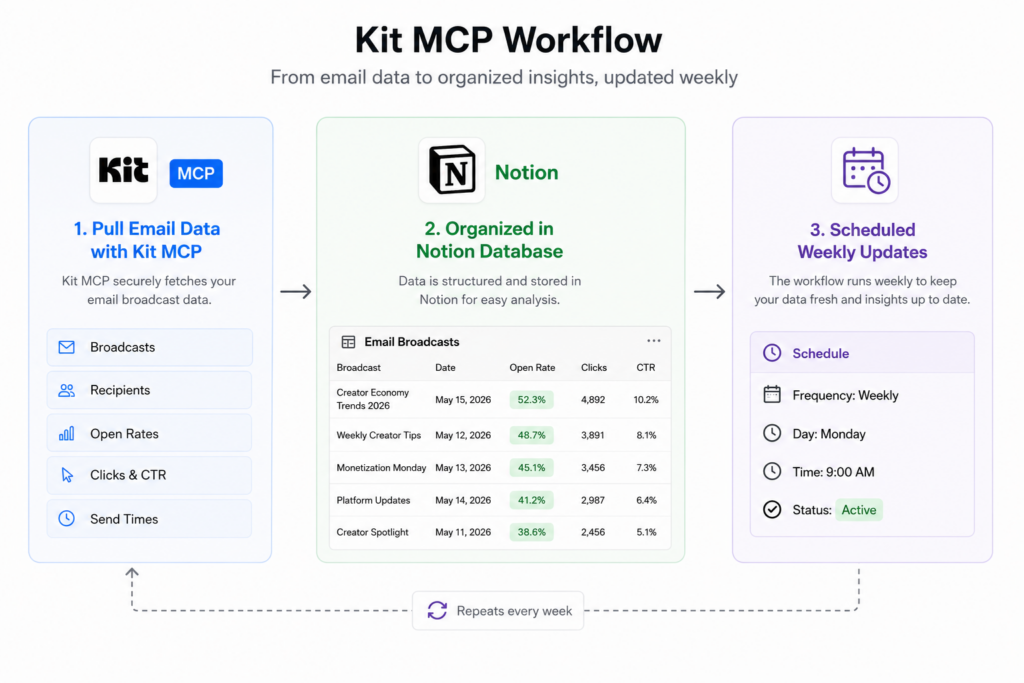
I had Cowork (Claude’s scheduled task feature) pull ALL of my emails. Subject lines, body copy, open rates, click-through rates. Going all the way back to 2016. It organized them, sorted them into 10 different categories, tagged which products I was promoting in each one (if it was a promotion), and added evergreen-style emails to a “reuse for evergreen funnels” tab.
All of this got added to a Notion database. And then I set up a scheduled task that runs every week, automatically adding any emails I sent in the previous week to the appropriate tab.
Full disclosure: I’d done a version of this before using a CSV export and Google Sheets. It was clunky. Now? It feels completely seamless.
The next step I’m working on: having Cowork pick appropriate “reuse” emails from Notion, optimize them, and add them back to Kit on a scheduled basis. Essentially recycling my best-performing emails automatically.
Another creator in the beta group did something similar. She analyzed over 5,000 broadcasts dating back to 2016 and had the AI group her active subscribers into a tiered system based on their purchase history, then suggest targeted campaigns for each tier. Being able to resurface old emails that were absolute gems (but would have stayed buried in the archive forever)? That’s the move.
Segment and Tag Subscribers on the Fly
Here’s a use case from the beta that shows the real power of engagement filtering.
One creator used the Kit MCP to build a “warm list” of 2,754 subscribers. The criteria? Anyone who had opened 5 or more emails in the last 30 days, scoped to specific broadcasts. She used that segment for an upgrade campaign.
Before the MCP, building that kind of targeted segment required either complex segment-builder workarounds or custom Python scripts. Technical stuff that most course creators shouldn’t need to deal with. Now it’s a three-prompt conversation.
You can also tier your subscribers by purchase history and have the AI suggest specific campaigns for each group. Your most loyal buyers get one type of message. Your window shoppers get another. Your cold subscribers get a re-engagement sequence. All built from a single conversation instead of hours of manual tagging.
Not sure what to ask first? I put together 29 ready-to-paste prompts organized by use case: performance analysis, list health, segmentation, writing, automation, and archive mining. Grab the free Kit MCP Prompt Pack below.
Create Live Dashboards and Automated Reporting
One beta creator running a product launch built two Notion dashboards that pull fresh Kit data every morning at 9:05 AM through a scheduled AI task.
The Daily Sales Dashboard auto-tags new buyers by the source they came through. The Email Performance Dashboard cross-references each buyer’s purchase timestamp with the email sent right before it. So every morning, the team can see exactly which email drove which conversions.
Before: manual data entry every morning of a launch. Hours per week. After: a self-updating dashboard that’s ready before you pour your coffee.
Another creator built a live artifact dashboard that actively pulls fresh data from the MCP. Not a static report, but something that updates in real-time. For anyone running launches or tracking email performance closely, this changes the game.
What Makes the Kit MCP Different from Other Email AI Tools?
The Kit MCP stands apart because it offers full read and write access, works with any MCP-compatible AI tool, and exposes Kit’s complete API with over 50 tools.
Let me break down why those three things matter:
Full read AND write access. Most email platform AI integrations let you look at your data. Maybe generate a subject line. That’s it. The Kit MCP lets you analyze data AND take action on it in the same conversation. Draft emails. Build sequences. Tag subscribers. Schedule broadcasts. The gap between “insight” and “action” disappears.
Any AI tool you want. You’re not stuck using Kit’s built-in AI (which may or may not be good). You bring your own. If you’re already deep into Claude for your business operations, you just add Kit to your existing workflow. No new interface to learn. No switching between apps.
Complete API coverage. This isn’t a “lite” version of Kit’s features. It’s the whole thing. Over 50 tools covering subscribers, broadcasts, sequences, tags, custom fields, forms, landing pages, purchases, webhooks, and more. If you can do it in Kit’s dashboard, you can do it through AI.
And the permission model matters too. You control what happens. You approve actions before they execute. You can revoke access any time. Nothing runs without your say-so.
Who Is the Kit MCP Best For?
The Kit MCP is built for creators, course creators, coaches, and entrepreneurs who use Kit and want to manage their email marketing through AI without coding or technical expertise.
You don’t need to be a developer. You don’t need to know what an API is. If you can have a conversation with ChatGPT or Claude, you can use this.
That said, here’s who I think gets the MOST value from it:
Course creators and coaches who are running launches, managing welcome sequences, tagging students by cohort, and trying to understand which emails actually drive sales. The MCP turns all of that into conversations instead of spreadsheets.
Newsletter creators who want to draft, schedule, and analyze their broadcasts without bouncing between three different tools. Write, analyze, optimize, and schedule from one place.
Solo entrepreneurs who don’t have a team to pull reports and build segments. This is like having an email marketing analyst on call 24/7. And it doesn’t charge by the hour.
Anyone sitting on years of email data they’ve never analyzed. If you’ve been sending newsletters for years and have no idea which emails were your best performers or which subscribers are your most engaged, the MCP will surface those insights in minutes.

Tips for Getting the Most Out of the Kit MCP
Here are a few things I’ve learned from a month of testing that will save you time:
Start with analysis before you take action. Before you start drafting emails or building sequences through the MCP, spend your first session just asking questions. What are my open rate trends? Which forms bring in the best subscribers? What does my list health look like? Get the lay of the land first. The insights you uncover will make every action you take after that more strategic.
Be specific in your prompts. “Analyze my emails” is vague. “Show me my top 10 broadcasts by open rate from the last 6 months, and identify what the subject lines have in common” is actionable. The more specific you are, the better the output.
Combine with scheduled tasks for true automation. The real magic happens when you pair the Kit MCP with scheduled AI tasks (like Claude’s Cowork feature). Set up a weekly task that pulls your latest broadcast data and adds it to a tracking database. Or one that identifies disengaged subscribers every month and tags them for a re-engagement sequence. That’s when it goes from “cool tool” to “essential infrastructure.”
Pair it with Notion for dashboards. Multiple beta creators built Notion databases that sync with Kit data through the MCP. If you want a living, breathing view of your email performance that updates itself, this is the setup.
Use it to resurface your best old content. Most of us have sent hundreds (or thousands) of emails and never gone back to look at what worked best. The MCP makes it easy to find your all-time top performers and recycle them into evergreen funnels. Those emails already convert. Why let them collect dust?
📥 Get the free Kit MCP Prompt Pack: 29 copy-and-paste prompts I use for email analysis, subscriber segmentation, sequence building, automated dashboards, and archive mining. No more staring at a blank prompt wondering what to ask.
Want to see how I’m using AI across my entire business, not just email? Watch my free AI workshop to see the full system behind my 25-hour work week.
The Bottom Line
The Kit MCP is not another AI gimmick bolted onto an email platform. It’s a genuine shift in how you can interact with your email marketing.
Instead of logging into Kit, clicking through dashboards, exporting CSVs, and manually building segments, you just… talk to your AI tool. And it does the work. The analysis, the drafting, the segmenting, the scheduling. All of it.
I’ve been building online businesses since 2010, and I’ve watched a LOT of “AI features” get added to tools I use. Most of them are forgettable. This one isn’t. The fact that it gives you full read and write access, works with whatever AI tool you prefer, and covers Kit’s entire API makes it the most complete AI integration I’ve seen in the email marketing space.
If you’re a Kit user, connect it today. It takes three minutes.
And if you’re not a Kit user yet but you’ve been thinking about switching your email platform? This might be the thing that tips the scale.
This is one powerful use case. For the bigger picture, see my guide on how to use AI in your online business.
📥 Get the Kit MCP Prompt Pack (free): 29 copy-and-paste prompts for course creators and coaches. Performance analysis, segmentation, sequence building, automated dashboards, email archive mining, and more. Drop your email below and it’s yours.
Kit MCP: The Complete Guide to AI-Powered Email Marketing