


No, you don’t need to change your AI workflow every time a new tool launches. Build your workflows around the jobs your business needs done, not whichever feature dropped this week. When something new comes along, ask one question: does this make an existing workflow meaningfully better? If yes, test it. If no, close the tab.
Let me back up.
Keeping up with AI has turned into a job of its own.
Monday, ChatGPT launches something. Tuesday, someone on YouTube swears it changes EVERYTHING. Wednesday, Claude ships an update. Thursday, LinkedIn has a new tool everyone apparently cannot live without.
By Friday, you’re wondering if the workflow you spent three weeks building is already obsolete.

It probably isn’t.
I’m very bullish on AI. I use it across my whole business, which I run in about 25 hours a week, and with a lean team of three. But I’m not reorganizing my company every time somebody ships a shiny new button.
There’s a difference between keeping up with AI and chasing AI. One makes your business better, and the other eats your afternoon.
What’s the difference between keeping up with AI and chasing AI?
Keeping up means adopting changes that improve a job your business already does. Chasing means rebuilding around every new release.
| Keeping up with AI | Chasing AI | |
|---|---|---|
| Starts with | A job your business needs done | Whatever launched this week |
| When a tool changes | You evaluate one step | You rebuild the whole system |
| How you test | A real task, in a separate sandbox | Straight into your live workflow |
| Your tech stack | Stays lean | Twelve tools, three doing the same thing |
| The result | Your business gets easier to run | AI becomes one more thing to manage |
Why does keeping up with AI feel so exhausting?
Most AI talk happens at the tool level: new models, apps, and features. Your business runs at the job level, and jobs change far more slowly.
New model. New app. New integration. New thing you MUST try immediately or be left behind forever. 👀
That’s not how I think about AI inside a business. I start with the job.
Emails need writing. Customers need answers. Content needs researching. Launches need planning. Numbers need analyzing. Podcast episodes need turning into social content.
Those jobs existed before ChatGPT. They’ll still exist after whatever version we’re using today gets replaced.
The job is the stable part. The tool is the variable.
Build around the tool and every update feels like an earthquake. Build around the job and a new tool becomes a quick evaluation, not an emergency.
Should you build your AI workflow around tools or jobs?
You should always build your AI workflows around jobs, not tools.
Say you send a newsletter every Thursday. The job looks something like this:
- Find the idea.
- Research the topic.
- Develop your point of view.
- Draft the email.
- Edit it into your voice.
- Add links.
- Schedule it.
That’s your workflow.
Now one of your AI tools releases a fancy new research feature. You don’t blow up your newsletter process. You look at step two and ask: does this improve how I research?
Better sources, 30 minutes back, or info your old setup kept missing? Swap it into that step. Everything else stays put.
The newsletter is the system. AI helps with specific jobs inside it.
So stop asking, “What can I do with ChatGPT?”
Start asking, “What jobs keep showing up in my business that I don’t need to do from scratch every single time?”
Monday morning content research is a job. Answering the same 15 customer questions is a job. Turning every podcast episode into show notes, an email, five posts, and a YouTube description is absolutely a job. Exporting numbers from three places every Friday and staring at them? Also a job.
Those are what you build systems around.
How do you decide if a new AI feature is worth changing your workflow?
Run it through three questions: does it make a workflow meaningfully better, can it do a job AI couldn’t do before, and is your current setup already working?
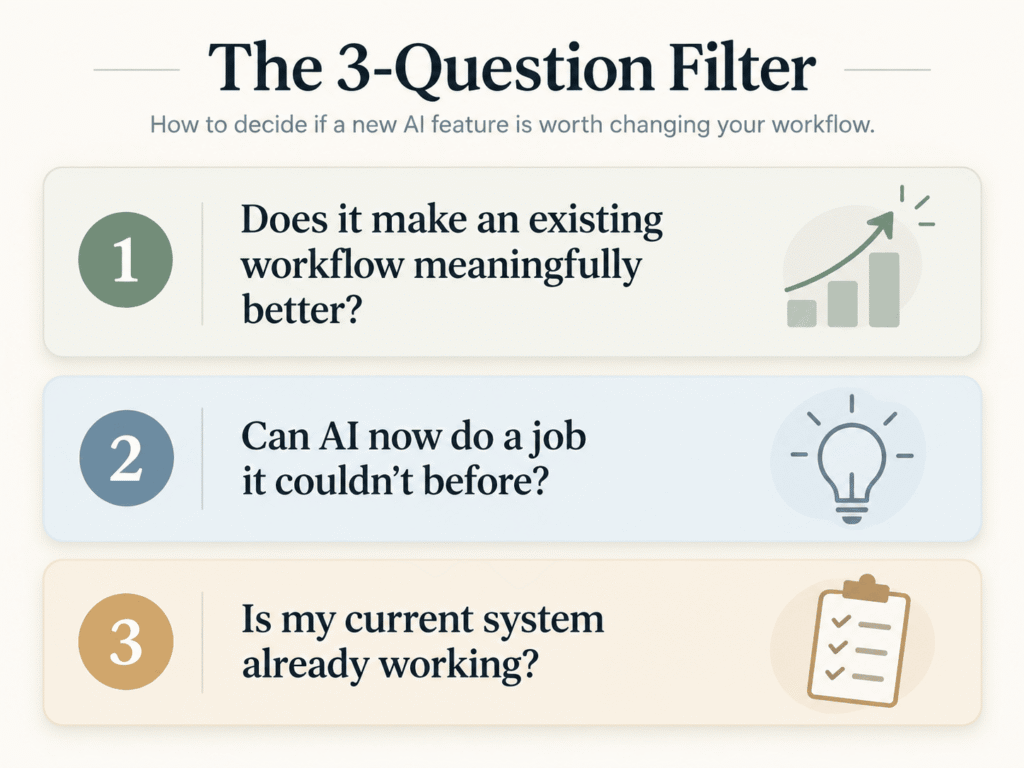
1. Does this make an existing workflow meaningfully better?
Not 4% better. Not “ooh, that’s kind of cool.”
Meaningfully better. It saves noticeable time, improves the quality, kills a manual step that annoys you every week, or lets you stop outsourcing something.
If your content workflow takes an hour and the new feature gets it to 50 minutes, I’m not rebuilding anything. Ten minutes isn’t worth adding complexity to a system that works.
Turn a three-hour job into 30 minutes? Now you have my attention.
2. Does this let AI do a job it couldn’t do before?
This is where I pay much closer attention.
Sometimes AI gets good at something in a way that opens a new door. It can finally read a file type you use constantly. It connects to information that used to take five manual steps. It handles a process that was too unreliable six months ago.
That’s not a shinier version of your current setup. That’s a job you might get off your plate entirely.
And THAT is the stuff I care about. I don’t want AI because AI is interesting. I want AI because there’s a long list of things I’d rather not spend my limited working hours doing.
3. Is my current system already working perfectly well?
This one saves me from a lot of pointless tinkering.
If the output is good and it takes very little of your time, you need a compelling reason to mess with it.
Business owners love optimizing. I get the urge. You find a tool that promises to shave off a few minutes, and suddenly you’re three hours deep in tutorials trying to save 12 minutes a month.
The math is not mathing.
Sometimes the smartest AI decision you can make is: Nope. What I have is fine.
What should you do when your favourite AI tool releases something new?
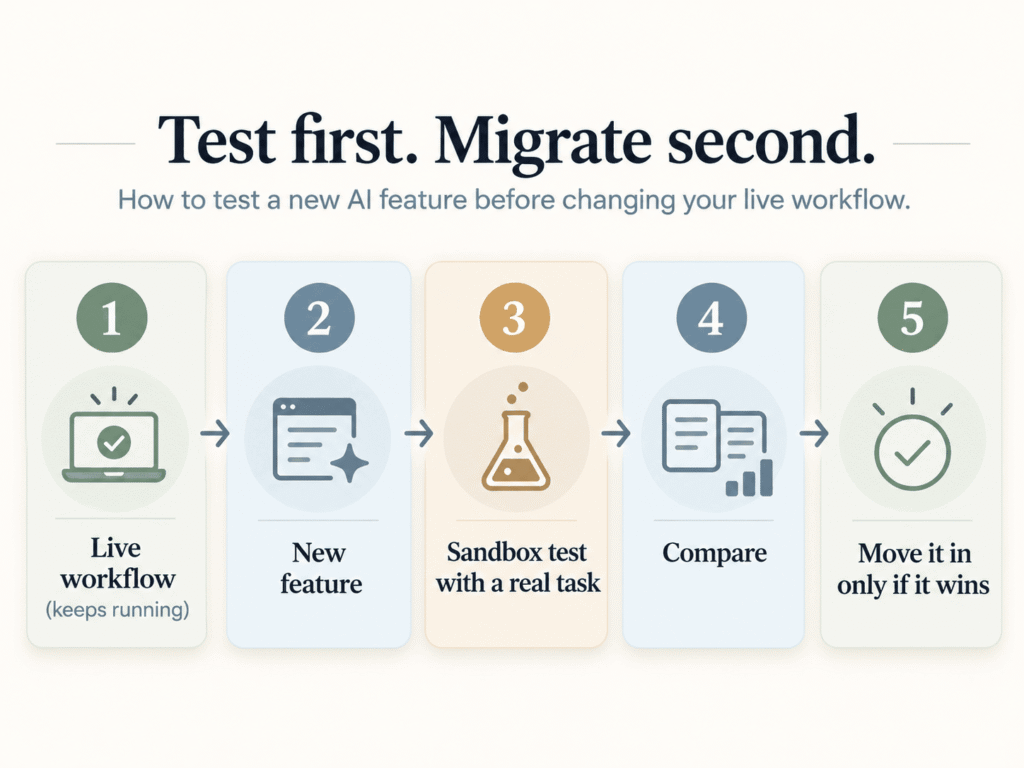
Test it in a separate sandbox with a real task from your business. Only move it into your live workflow once it beats what you already have.
Keep the system that works. Take the new feature somewhere separate and give it a real job.
Not a demo. Not “write me a poem about entrepreneurship.” Something you do every week: last week’s newsletter, a sales page, a batch of testimonials, a customer research doc.
Then compare. Was the output better? Faster? Did it need less hand-holding? Would you trust it every single week?
Yes? Move it in. No? You learned what you needed and lost nothing.
Test first. Migrate second. That one rule will save you a lot of chaos.
Which AI updates are worth paying attention to?
Watch for four things: a big jump in quality, a manual step disappearing, AI getting better access to your business context, and new capabilities.
When quality jumps
If the output on a task you do often gets dramatically better, pay attention. More trustworthy research, noticeably better writing, sharper reads on your business data. Quality alone can justify changing a workflow.
When a manual step disappears
One of my favourites. Any time AI removes copying, pasting, downloading, uploading, reformatting, or sorting, I want to know about it. Those steps aren’t hard. They just add up.
When AI can access better context
The more your AI knows about your documents, brand, customer research, and systems, the more useful it gets. Context is what turns AI from a random chatbot into something that helps run a company.
When a new capability changes what’s possible
Not because the internet is excited about it. Because a process you assumed needed a human sitting there for two hours can suddenly be done another way. Those are worth experimenting with.
What parts of your AI workflow should stay the same?
Most of it. Your audience, offers, point of view, and brand voice don’t change when a new model launches. Your AI should sit on top of those.
Your customer journey doesn’t need reinventing because your chatbot got smarter. The framework behind a strong sales email didn’t expire overnight.
That’s why I’m so fired up about documenting the foundations of your business. Your Brand Book. Your offers. Your customer research. Your marketing frameworks. Your examples. Your SOPs. Your actual opinions.
That’s the layer your AI should sit on.
Tools can change underneath it. ChatGPT today, Claude tomorrow, something else three years from now. If the intelligence of your business is documented, you’re not rebuilding from scratch.
You’re moving the same brain into a better machine.
If that foundation doesn’t exist yet, start with the 2-Hour Brand Book. It’s the one doc I’d build before touching another AI tool.
What if I fall behind on AI?
You won’t fall behind by skipping tools. The better measure is whether your business is easier to run today than it was six months ago.
This is the fear underneath all of it, right? AI moves so fast that if you don’t try everything, you’ll wake up in six months and everyone will know something you don’t.
I get it. I teach AI. I spend way more time looking at this stuff than the average business owner should.
And even I don’t use everything. Nobody can.
There’s no finish line where you finally know every tool, model, and feature. So “keeping up” is a useless goal. Ask these instead:
- Are you creating good content faster?
- Do your AI tools understand your business better?
- Are you doing less repetitive work?
- Is your team spending less time on $15/hour tasks?
- Can you close the laptop earlier without things falling apart?
That’s progress. Knowing the name of every new AI startup is not.
Is your AI tech stack getting too complicated?
If you’re maintaining a dozen tools and a pile of automations, AI has become a job. The best AI system is the one you barely think about.
I see this constantly. Twelve AI tools. Seven automations. Four subscriptions. Three bots that sort of do the same thing. A spreadsheet explaining which AI handles which task.
And somebody has to maintain all of it.
Congratulations. You’ve invented a new department. 😂
The goal is a business that runs better with less effort from you. Sometimes that means a powerful new tool. Sometimes it means sticking with the boring setup you’ve had for six months because it works beautifully.
I’ll take boring and reliable all day long. Impressive workflow diagrams are optional.
What should you do first?
- List the jobs that repeat in your business every week.
- Note which step AI handles inside each one.
- When a new launch catches your eye, find the one step it could affect.
- Run it through the three-question filter.
- If it passes, test it in a sandbox with a real task.
- Migrate only when it wins.
Frequently asked questions
How often should I update my AI workflow?
Only when a change passes the filter: it makes a workflow meaningfully better, does a job AI couldn’t do before, or fixes something that isn’t working. There’s no set schedule. A workflow that runs well and saves you time can stay untouched for months.
Is it bad to use a lot of different AI tools?
It becomes a problem when you’re maintaining tools instead of running your business. If several tools do the same job, or you need a spreadsheet to track which AI does what, consolidate. Fewer, well-trained tools beat a big stack that needs babysitting.
How do I test a new AI feature without breaking my workflow?
Keep your live workflow as is and test the feature separately with a real task, like last week’s newsletter or a batch of testimonials. Compare the output, speed, and how much editing it needed. Move it into your workflow only if it clearly wins.
Will my AI workflow become obsolete?
Not if it’s built around jobs instead of a specific app. The tasks your business needs done stay stable even as tools change. When a better tool appears, you swap it into the step it improves, and the rest of the workflow keeps running.
Which AI tool should I build my workflow around?
None of them, specifically. Build around the jobs your business needs done and document your brand, offers, and audience so any tool can use them. That way you can move between ChatGPT, Claude, or whatever comes next without starting over.
Your workflow should outlive the tool
You’re not trying to build the perfect ChatGPT workflow. You’re building the best way to run your business. AI is one layer of that, and yes, that layer changes fast.
Good. Let it.
Things that take an hour today might take five minutes next year. I’m VERY here for that.
But your job isn’t to chase every release. It’s to spot the improvements useful enough to make your business better.
AI is your COO, not your CEO. You still decide what deserves your attention.
Keep your time for the stuff that needs you. The ideas. The strategy. The relationships. The decisions. And, frankly, your actual life.
Because if using AI means spending every waking hour keeping up with AI… we have spectacularly missed the point.
I write about AI, marketing, and building a business that leaves room for a life every week in Noted. If that’s your kind of thing, come join me.
Where to go next
- How to Use AI in Your Online Business (Without Losing Your Voice): The bigger picture of where AI belongs in your business.
- How to Train AI to Write in Your Brand Voice (So It Actually Sounds Like You): For when you’re tired of editing every draft until it sounds vaguely human.
- Does Your Content Have Soul? The New Marketing Test: What AI should execute, and what still has to come from you.
- The Brand Book: The Missing Piece in Every AI Assistant: The foundation layer that makes switching tools painless.
How to Keep Up With AI Without Rebuilding Everything